ImageXi
Microscopy Image Processing
ImageXi is a Photoshop/Illustrator CEP plugin designed for scientific image processing, particularly optimized for microscopy images. It provides a rich set of automation tools for layer adjustments, text annotations, scale bar creation, and channel operations.
Interface Overview
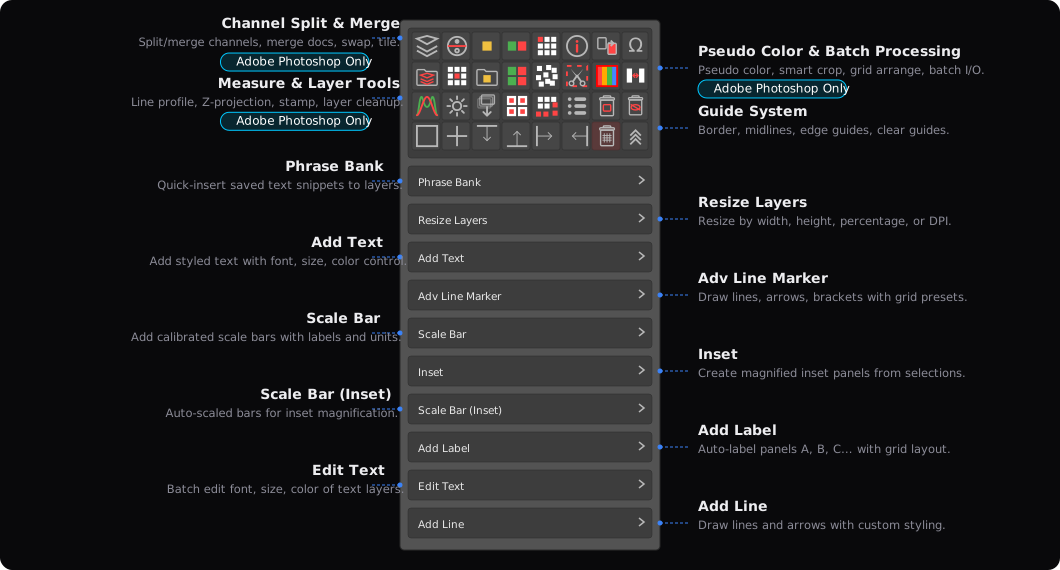
Key Features
Match Color
Automatically match brightness and color across multiple microscopy images for consistent figure panels.
Match Color (Cross-Doc)
Match brightness and color across multiple open documents — unify exposure from different imaging sessions.
Scale Bar
Create scale bars in simple or professional mode with automatic calculation from existing calibration.
Scale Bar Style
Change scale bar appearance across all panels at once — switch styles without recreating bars.
Inset
Create magnified insets from selected regions with optional strokes and connector lines.
Inset (Illustrator)
Same magnified inset workflow in Illustrator — works with linked images on artboards.
Pseudo Color
Apply solid pseudo color to grayscale fluorescence layers using Multiply blend mode.
Change Pseudo Color
Switch pseudo color assignments on existing layers — quickly try different color combinations.
LUT Pseudo Color
Apply multi-color LUT gradients (Fire, Ice, etc.) via Gradient Map for intensity-based visualization.
Custom Pseudo Color
Define custom RGB colors for pseudo color — go beyond preset palettes for any channel mapping.
Colorize Selection
Colorize specific structures in SEM/TEM grayscale images by painting color onto selected regions.
Desaturate
Smart desaturation using Channel Mixer — auto-detects the brightest channel for optimal grayscale conversion of fluorescence images.
Add Text
Quickly add annotation text at specified positions on images with support for multiple texts and background shapes.
Phrase Bank
Common microscopy phrase library — quickly insert fluorophore names like DAPI, EGFP, mCherry with one click.
Merge Layers
Overlay 2–3 same-size layers using Screen blend mode to compare image differences at a glance.
Batch Merge
Batch process an entire folder — merge layers for comparison across all documents automatically.
Merge Docs (Screen)
Merge all open documents into one using Screen blend mode — overlay fluorescence channels for composite visualization.
Batch Merge & Save
Batch process an entire folder — merge documents with Screen blend and save as TIFF automatically.
Split Channels
Split a fluorescence image into individual color channels with pseudo color applied — one click from RGB to publication-ready panels.
Batch Split Channels
Batch process an entire folder — split channels and apply pseudo color for all documents automatically.
Batch Split (Single File)
Batch split channels for a single multi-layer document — process all layers without opening each one.
Add Label
Automatic sequential labeling (A, B, C or 1, 2, 3) for multiple layers with replace mode.
Grid Arranger
Arrange multiple layers into a grid with configurable rows, columns, spacing, and optional resize.
Realign Grid
Realign layers back to a neat grid — fix misaligned panels after manual adjustments.
Tiling
Duplicate selected layers into a grid pattern — quickly tile a single image into rows and columns.
Adv Line Marker
Advanced multi-row annotation tool with cell merging and automatic line splitting.
Rounded Corners
Apply rounded corner masks to image layers — add a polished look to microscopy panels.
Remove Rounded Corners
Strip rounded corner masks from layers to restore the original sharp edges.
Stamp
Stamp annotations, scale bars, and labels from one panel onto all other panels — apply consistent formatting across an entire figure.
Batch Adjust
Batch adjust brightness, contrast, and levels across multiple layers or documents at once.
Resize Layers
Precisely scale selected layers to a target pixel dimension.
Smart Crop (Illustrator)
Crop images in Illustrator with two modes: use another image as a clipping reference, or snap to guides for precise region extraction.
Step Rotate
Fine-tune microscopy image rotation one click at a time. Each click rotates the layer (or canvas for single-layer documents) by a fixed angle — 5° clockwise by default. Right-click to change direction or angle, scroll wheel to flip direction, and long-press to reset.
Blend Mode
Quickly set blend modes on selected layers. Five modes via right-click: Toggle Screen/Normal, Toggle Multiply/Normal, Set Screen, Set Multiply, and Set Normal. Supports multi-layer selection, scroll wheel to cycle modes, and long-press to reset.
Pricing
All licenses are one-time purchases with free minor updates. Each Adobe license key includes two activations — use them for Photoshop and Illustrator, or any combination you prefer. PowerPoint license keys include one activation.