WesternBo
Western Blot & Gel Tools
WesternBo is a Photoshop/Illustrator CEP plugin specifically designed for Western Blot image processing. It helps researchers quickly and accurately annotate, layout, and beautify WB images. All graphic elements are implemented as vector shape layers, ensuring crisp rendering at any zoom level.
Interface Overview
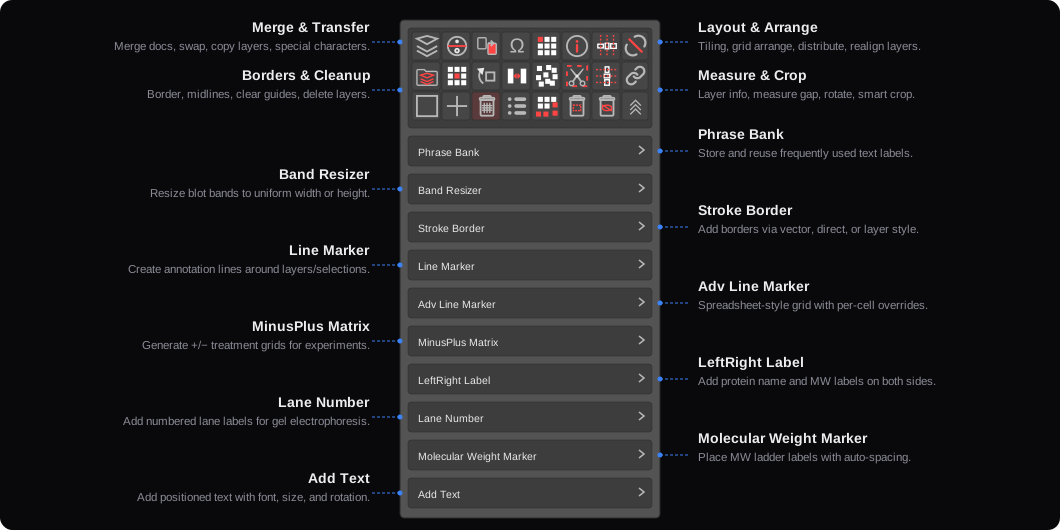
Key Features
MinusPlus Matrix + Line Marker
Add line markers, plus/minus matrices, and lane labels above blot images — a complete top annotation workflow.
Stroke Border
Add precise vector borders to selected layers with multiple modes: Vector, Clipping Mask, Layer Style, and Direct.
Molecular Weight Marker
Add molecular weight rulers to WB images via manual click or logarithmic spacing mode.
MW Marker — Guide Feedback
Click to place molecular weight positions with real-time guide feedback — see exactly where each marker lands, then guides are auto-cleared after generation.
MW Marker — Click-Match Mode
No need to select the target image first — just click directly on a blot and the plugin auto-detects which image to annotate by click coordinates. Now the default mode, eliminating misplaced markers entirely.
Batch Merge & Save
Batch process an entire folder of PSD files — merge, flatten, and save as TIFF automatically.
Swap Layers
Swap the positions of two selected layers instantly — rearrange blot strips or panels without manual alignment.
Vector Lines (Cover Mode)
Generate full-width vector shape lines across blot images — ideal for separating groups or marking regions in Line Marker's Cover mode.
Add Text
Batch-add multiple text layers at once — type all protein names in a single input and place them in one step.
Rotate & Smart Crop
Straighten a tilted blot and crop white borders in one go — two Quick Action buttons working together.
Toggle Sign + Realign Grid
Generate plus/minus treatment condition matrices, toggle signs, and re-align to grid in one click.
LeftRight Label
Generate protein name and molecular weight labels on both sides of blot images in one step.
Copy to All Docs
Copy selected layers into every other open document at once — assemble all sub-figures into one file in seconds.
Phrase Bank
Common phrase library for quickly inserting experiment annotation text.
Adv Line Marker
Advanced multi-row annotation tool with cell merging and per-cell style overrides.
Band Resizer
Precisely scale band layers based on target dimensions with long-press averaging.
Lane Number
Automatically add evenly distributed lane numbers to blot images with customizable prefix and indent.
Merge Docs (Multiply)
Merge all open documents into one using Multiply blend mode — ideal for combining chemiluminescent and marker images.
Copy to Another Doc
Copy selected layers to a specific open document — quickly duplicate annotated panels between figures.
Measure Spacing
Measure distances between layers or guides — useful for checking lane alignment and annotation spacing.
Special Characters
Insert Greek letters and scientific symbols (α, β, γ, ±, °, µ…) directly into text layers with one click.
Clone Number (Sequential)
Label sequential clone numbers on blot lanes for immunoblot screening.
Clone Number (Non-sequential)
Label non-sequential clone numbers on blot lanes for immunoblot screening.
Normalize Minus Signs
Enable "Normalize Minus" in Toggle Sign's right-click menu, then click to replace all hyphens with standard mathematical minus signs (U+2212).
Lane Number (Custom Range)
Set custom start and end numbers for lane labeling — no longer limited to starting from 1.
Toggle Sign — All-in-One
One button for all plus/minus operations: toggle, normalize minus, set all to + or −. Right-click for menu, scroll to cycle, long-press to reset.
Phrase Bank — Edit Mode
Drag to reorder custom phrases in edit mode — no more deleting and re-adding to rearrange.
Adv Line Marker — Full Walkthrough
A complete walkthrough of Adv Line Marker: build the entire top annotation — plus/minus matrix, group brackets, and side labels — in one step. Covers cell merging, partial text rotation, and side-text editing. Save your layout as a preset and reuse it next time with minimal tweaking. Tip: right-click the table to access a context menu for inserting or deleting rows and columns.
Straighten — Vertical & Auto Modes
Straighten now supports Vertical and Auto modes. Draw a near-vertical line to straighten vertically, or use Auto mode to detect orientation automatically.
Blend Mode
One-click blend mode toggle on the panel. Set a band to Multiply, overlay it on a reference, and resize — makes matching band widths quick and intuitive.
Save & Load Presets
Save your current settings as a preset for any sub-panel (Line Marker, Adv Line Marker, etc.) and load them later. Great for keeping consistent annotation styles across figures and sharing configurations within your lab.
Rename Preset
Double-click a preset name to enter edit mode and rename it inline.
Pricing
All licenses are one-time purchases with free minor updates. Each Adobe license key includes two activations — use them for Photoshop and Illustrator, or any combination you prefer. PowerPoint license keys include one activation.